Acquisition Plugins in MNE Scan
Acquisition plugins (also called sensor plugins) are the entry point for all data in MNE Scan. They interface with hardware devices or data sources — EEG amplifiers, MEG systems, file readers, or simulated signals — and stream data into the real-time processing pipeline.
Three-Tier Architecture
All acquisition plugins follow a consistent three-tier architecture that separates concerns between the MNE Scan framework, the data acquisition logic, and the hardware driver:
| Tier | Class Role | Responsibilities |
|---|---|---|
| Plugin (top) | Main plugin class, inherits from AbstractSensor | Communicates with MNE Scan; manages the GUI (setup widget, toolbar buttons); creates and owns the Producer |
| Producer (middle) | Data acquisition controller | Manages the acquisition thread; pulls data from the Driver and pushes it into ring buffers; bridges Plugin ↔ Driver |
| Driver (bottom) | Hardware/device interface | Directly communicates with the device SDK or API; handles device initialization, parameter configuration, and raw sample retrieval |
This separation means that the Plugin and Producer classes are structurally similar across all acquisition plugins — only the Driver class changes significantly depending on the hardware.
┌─────────────────────────────────┐
│         MNE Scan                │
│  (plugin pipeline framework)   │
└──────────┬──────────────────────┘
           │  ← AbstractSensor interface
┌──────────▼──────────────────────┐
│       Plugin Class              │
│  (e.g. GUSBamp, BabyMEG,       │
│   FiffSimulator, LSLAdapter)    │
│  • GUI setup widget             │
│  • Start/stop acquisition       │
│  • Output connectors            │
└──────────┬──────────────────────┘
           │
┌──────────▼──────────────────────┐
│      Producer Class             │
│  (e.g. GUSBampProducer)         │
│  • Runs acquisition thread      │
│  • Ring buffer management       │
│  • Calls driver for samples     │
└──────────┬──────────────────────┘
           │
┌──────────▼──────────────────────┐
│       Driver Class              │
│  (e.g. GUSBampDriver)           │
│  • Device SDK calls             │
│  • Parameter configuration      │
│  • Raw sample retrieval         │
└──────────┬──────────────────────┘
           │
     ┌─────▼─────┐
     │  Hardware  │
     │  Device    │
     └───────────┘
Example: gUSBamp EEG Driver
The gUSBamp plugin illustrates this pattern:
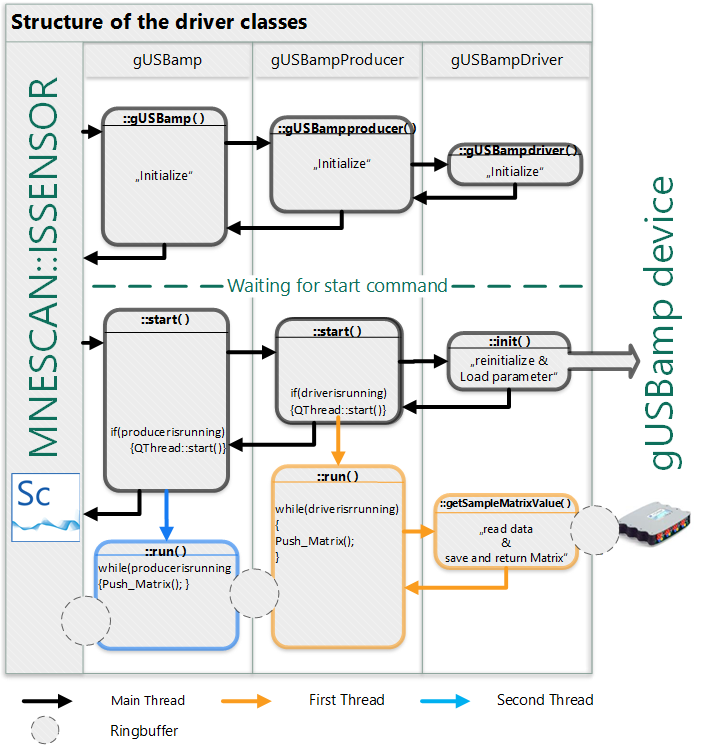
The left side shows the MNE Scan boundary; the right side shows the hardware device. The three classes mediate between them:
- gUSBamp — main plugin class; communicates with MNE Scan and manages the GUI.
- gUSBampproducer — controls the acquisition thread and bridges the plugin with the driver.
- gUSBampdriver — communicates directly with the gUSBamp amplifier hardware.
Data Flow
All three classes are constructed sequentially during plugin initialization, setting up default parameters. Once initialized, the plugin waits for a start command or parameter changes from the GUI.
Starting Acquisition
Starting acquisition triggers a chain: the Plugin starts the Producer, and the Producer starts the Driver. The Driver initializes the hardware and begins sampling. Both the Plugin and Producer run internal threads that pull data from the class below and push it upward via ring buffers (CircularBuffer), creating a continuous data stream into MNE Scan.
Stopping Acquisition
When stopping the acquisition, both threads are interrupted by setting the m_bIsRunning flag to false, and the Driver class puts the device into standby mode. The ring buffers are flushed and reset.
Key Base Classes
| Class | Location | Purpose |
|---|---|---|
AbstractSensor | src/applications/mne_scan/libs/scShared/ | Base class for all acquisition plugins |
CircularBuffer | src/libraries/utils/ | Lock-free ring buffer for inter-thread data transfer |
PluginOutputData | src/applications/mne_scan/libs/scShared/ | Typed output connector that passes data to downstream plugins |
Implementing a New Acquisition Plugin
To create a new acquisition plugin:
- Copy an existing plugin folder (e.g.,
dummytoolboxorfiffsimulator) as a template. - Create three classes:
MyPlugin(inheritsAbstractSensor),MyPluginProducer, andMyPluginDriver. - Implement the Driver to interface with your device's SDK — initialize the device, configure parameters, and read raw samples.
- Implement the Producer to run the acquisition loop in a separate thread, pulling samples from the Driver and pushing them into a
CircularBuffer. - Implement the Plugin to set up the GUI, create output connectors, and manage the start/stop lifecycle.
- Register the plugin in the parent
CMakeLists.txtand, for static builds, inmain.cppviaQ_IMPORT_PLUGIN.
See Creating a Plugin for the general plugin scaffolding guide.